Skip to content

Consilience for teams

Document-based ontologies for your organization

Consilience lets teams build and maintain an ontology from documents without a resident FDE, using the same product individuals can start with for free. Domain owners manage vocabulary and decisions; we help review deployment and integration requirements.

Machined parts, seals, a measuring tool, and inspection records on a workbench

An example from manufacturing

Investigating defects across inspection records

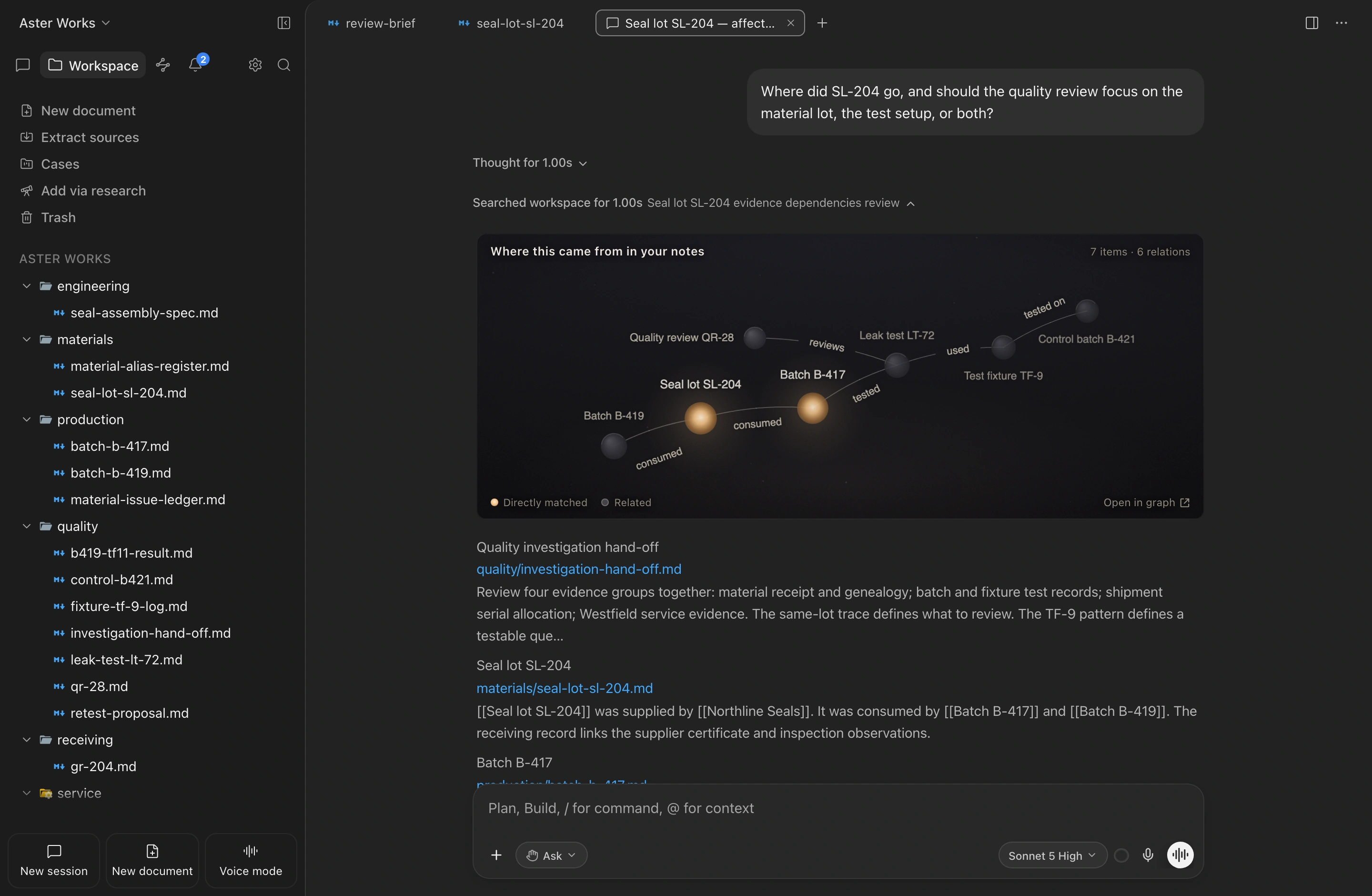
At Aster Works, a failed inspection points to a seal lot. Connecting batch records, test setups, and a control run reveals another lead: the fixture used in testing. The team can investigate the right cause before widening the hold.

Explore the manufacturing workspace
Aster Works investigation across batch records and test conditions

From your documents to daily work

Automated construction and human review

No FDE required means document-based ontology construction and updates do not depend on a resident, forward-deployed engineer. Domain judgment and approvals, business-system integrations, deployment configuration, and organizational adoption remain your team’s responsibility.

Document import and relationship extraction

Bring in the records behind one recurring question. The product derives vocabulary, extracts relationships, and proposes structure.

Review of types, merges, and sources

Domain owners review types, merges, and source evidence. Enable automatic extraction to reflect edited documents; re-extract older notes when changing vocabulary policy.

Deployment and access policies

IT and security teams define model, access, and integration policies. Rollout support is separate from recurring ontology construction and upkeep.

Storage and inference

Data storage and AI request routing

Read about security

Local workspaces

Local workspace notes, graph data, and indexes are stored on your device. Source notes remain Markdown; export the graph, vocabulary, and decisions together to preserve their meaning.

Consilience hosting

The optional web workspace stores and processes its content on our hosted servers. The content is stored on the server rather than in a local workspace.

2.0: your internal servers

Ahead of public release, review an organization-operated server deployment with local models or administrator-approved endpoints. Installation and access policy require your team’s configuration.

Model connection options

Consilience service requests use its relay. Direct model connections use the configured provider; local or internally managed models use that environment. Local document storage alone does not make AI requests offline.

Consilience 2.0 · Enterprise deployment review

On-premises deployment for your organization

Discuss an internal-server deployment and administrator-selected models for your organization’s data policies. This 2.0 deployment option is under review ahead of public release.

Storage on your own servers

Explore a setup that stores notes and ontology data on infrastructure your organization operates.

Local models and approved endpoints

Configure AI requests to use a local model or an endpoint selected by your administrator.

Control of external services

Explore a deployment with internet access blocked or limited to approved services.

Installation, model availability, access controls, and integrations require an environment review. Tool availability varies by deployment; organization SSO and SAML are planned.

Consilience Enterprise

Enterprise deployment consultation

Tell us your storage, model, access, and system-integration requirements. We will review deployment options and the scope of support. Public plans remain available without a consultation.

Enterprise deployment inquiry

Tell us about your environment and we'll review deployment options with you. We reply within one business day.

Opens your email app with the details filled in.

Consilience for Enterprise